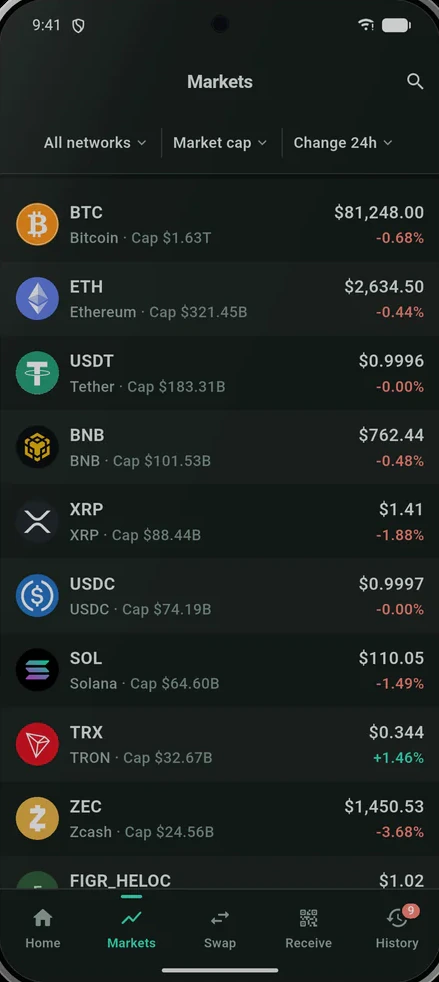
Self-custody · Multi-chain · All accounts

Each wallet has its own recovery phrase. No company holds your coins — not even us.

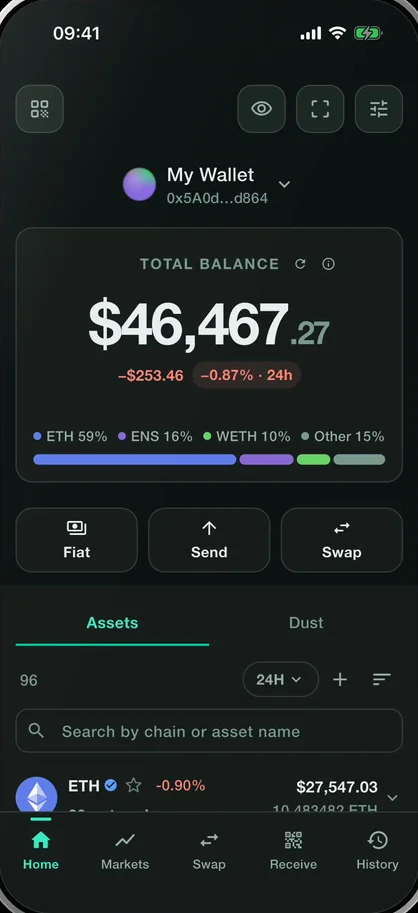
Smartable Wallet — total balance across every network, one row per asset

Four pillars

What it actually does

Four things, done without steering you

Nothing on the wallet screen is highlighted to push you toward the action we earn money on. That is a product decision written into the code, not a promise on a website.

01 · Reach

Every chain you actually use

80+ networks from one recovery phrase, including Bitcoin, Solana, TON, Cardano, Polkadot, Kaspa and Zcash.

02 · Safety

Warnings that fire before you sign

Look-alike addresses, unverified contracts, phishing sites and unlimited approvals are caught on the review screen, in words, while you can still stop.

03 · Recovery

Backup that isn't one sheet of paper

Split your recovery into SLIP-39 shares kept in different places, add a Ledger, or watch an address you don't hold keys to.

04 · Honesty

The net amount, before you confirm

You see what lands in your wallet, in your currency, with the fee stated. Partners are named whenever your funds leave the app.

Safety

The wallet that warns you first.

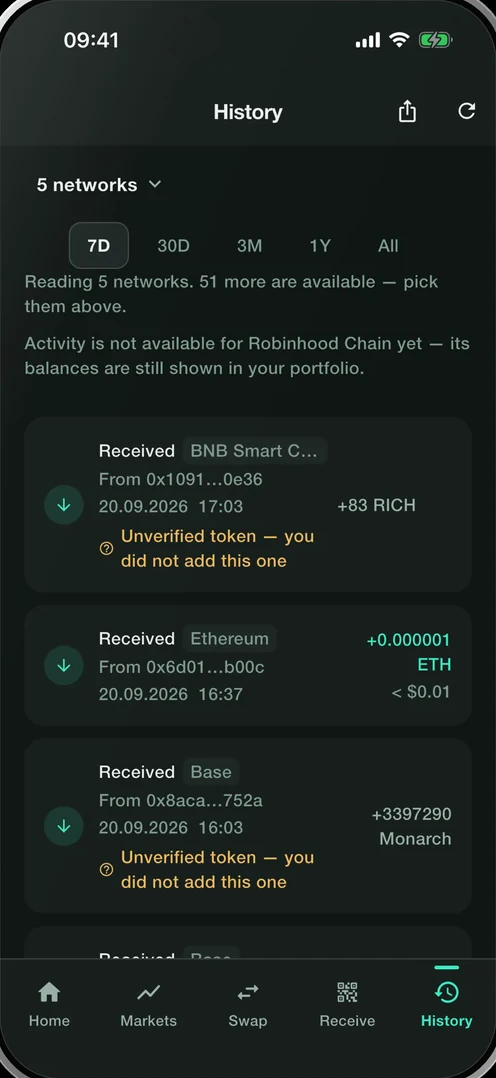
Most losses are not hacks — they are lookalikes, fakes and phishes. Smartable surfaces the warning before you sign, not after. Both warnings on this screen are real product copy.

  • Unverified tokensAirdropped tokens you never added are marked “Unverified token — you did not add this one” — visible, but never blended into your balance.
  • Silent contractsWhen contracts on other chains do not answer, the history says so — in this screenshot, 47 more did not answer. Silence is shown, not hidden.
  • Lookalike addressesAddresses that copy the first and last characters of yours are flagged before you send.
Smartable history screen flagging an unverified token and unanswered contracts

Recovery

One phrase. Or split it.
Losing your phone should be an inconvenience, not a loss. Three levels of backup — pick one, or stack them.

01

Write the phrase down

Twelve words, on paper. One phrase covers every network.

02

Verify it

The app asks you to confirm it — a backup you have not tested is a hope, not a backup.

03

Split it (optional)

Split the backup into SLIP-39 shares kept in different places. No single share is enough.

Smartable import screen with the option to restore from a split backup

Trade

Swap it. Or buy it outright.

Swap across chains

Quoted from several routes at once — 0x, Jupiter, THORChain, LI.FI — with the net amount and the fee before you confirm.

  • 0x1.00 ETH → 3,412 USDCBest net
  • Jupiter1.00 ETH → 3,398 USDC
  • THORChain1.00 ETH → 3,371 USDC

Swap across chains

Buy with a card

Buy with a card, cash out to one. MoonPay and Coinbase; their fee is shown before you confirm.

€500 → 0.1482 ETH · fee €4.90 shown before confirm

Buy with a card

Comparison

Honest comparison.

Against a typical EVM wallet. Where we fall short, the table says so.

CapabilitySmartableTypical EVM wallet
Non-EVM chains22 first-classUsually none
Split backup (SLIP-39)YesNo
Approval scopeOne tradeOften unlimited
Lookalike-address guardYesNo
Fee disclosureNet + fee before you confirmVaries
Independent auditNot yetVaries

Honesty

What we are not, yet.

  • Not in the app stores yet.
  • No third-party audit yet — when there is one, the report will be linked here.
  • NFTs are switched off.
  • Some regions are not served.

FAQ

Straight answers.

Get started

No account. No email. No custody. Just the app.

Nothing on this website constitutes investment, financial, legal, or tax advice. All information is provided for informational purposes only. Smartable Wallet is non‑custodial, self‑custody software; you are solely responsible for your own decisions and for securing your private keys. Digital assets are volatile and can lose value. Past performance is not indicative of future results. Please view our Terms of Use for more information.

© 2026 Smartable™. Self-custody means you are responsible for your own keys. Non-custodial. Your keys never leave your device.